A Fronius welding job and a robot part program are not the same thing. The welding job identifies process information; the part program organizes the motion and sequence used on an assembly. Keeping those concepts distinct helps buyers evaluate how WeldX presents approved work to the team.
In this Article
- Understand the difference between a job and a part
- Ask for recognizable information
- Three items that should not be confused
- A returning-order example
- What a buyer can verify in a demonstration
Understand the difference between a job and a part
A welding job represents process information; it is not necessarily the complete robot program for an assembly. A part may require a sequence of motions and welding operations, and the proposed workflow needs to make those relationships clear.
Fronius documentation covers job-based functions within its configured equipment. Confirm how the proposed integration selects and uses that information rather than assuming every interface presents it the same way.
Ask for recognizable information
Spartan's WeldX feature library describes readable names paired with Fronius job numbers. The practical idea is to make a process selection easier to recognize without changing the numeric job sent to the welder.
That feature does not establish whether a selected job is appropriate for a new part. The team still needs an approved process and a clear way to manage changes. Usability supports the production method; it does not replace it.
Three items that should not be confused
| Item | Purpose | Example of a misunderstanding |
|---|---|---|
| Welding job number | Identifies the welding selection used by the configured system | Assuming the number contains the entire part path |
| Readable job label | Helps people recognize the intended selection | Assuming a friendly name validates the process |
| Robot part program | Organizes the assembly's programmed sequence | Assuming every weld in the program must use one process selection |
Examples depend on the configured system. Labels and sample names in a demonstration are not recommendations for welding parameters.
A returning-order example
Imagine two assemblies with similar names but different approved welding selections. An operator needs to identify both the correct part program and the intended process information. A readable label can make that relationship easier to recognize, but it cannot prevent every wrong selection by itself.
Spartan's feature library describes a local job library pairing Fronius numbers with names. That is a concrete function to demonstrate. It should not be expanded into an unverified claim that the system automatically manages approvals, revisions, or every aspect of quality control.
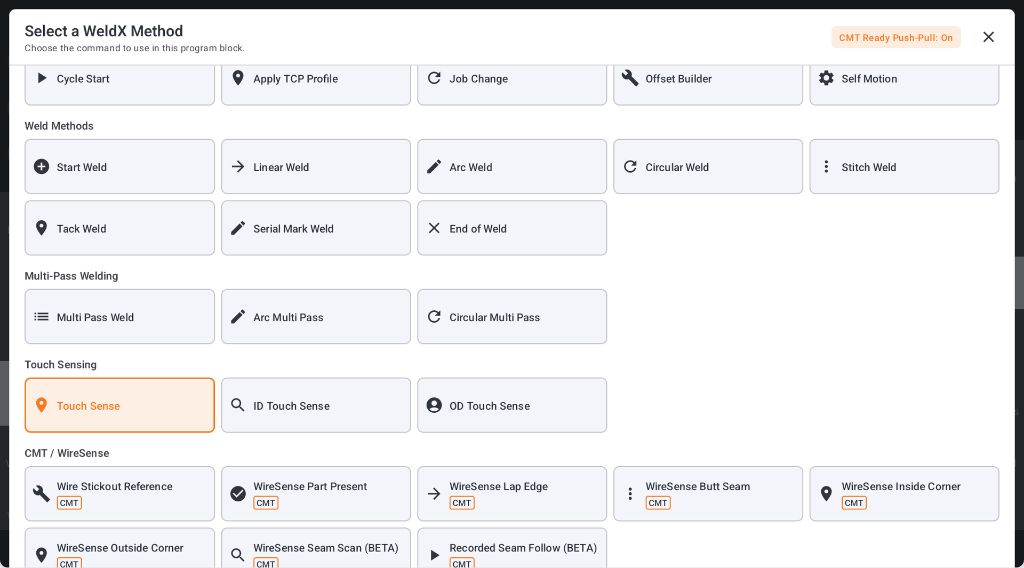
WeldX method-selection screen. A demonstration should also show the job-selection workflow for the proposed application.
What a buyer can verify in a demonstration
Have the demonstrator identify the part program, show its welding selection, and explain how the team distinguishes two similar returning jobs. Then ask what is preserved when a label or program is changed. The answer should describe the actual offered workflow, not an assumed feature based on a menu name.
This review makes WeldX relevant to daily production: people can understand what a prepared job is intended to do. It also keeps process validation separate from interface convenience, which is essential when a cell will support several approved assemblies.
Related Reading
- Cobot Welding Software: What Shops Should Look For Before Buying
- Fronius Cobot Welding: What Existing Fronius Users Should Review Before Automating
Discuss Your Welding Application
Works Cited
Fronius International. "TPS 320i, TPS 400i, TPS 500i, TPS 600i: Operating Instructions." Fronius, https://manuals.fronius.com/html/4204260114/en.html. Accessed 14 Sept. 2026.
Fronius International. "TPS/i Interface Signal Descriptions." Fronius, https://manuals.fronius.com/html/4204260227/en-US.html. Accessed 14 Sept. 2026.